Getting the Most Out of Auggie
A Practical Guide for Marketers
Running Virtual Focus Groups and Consumer Insight Sessions
Quick Start: Get Value from Auggie in 30 Minutes
The first two pages walk you through one high-quality research session that surfaces real insight — fast.
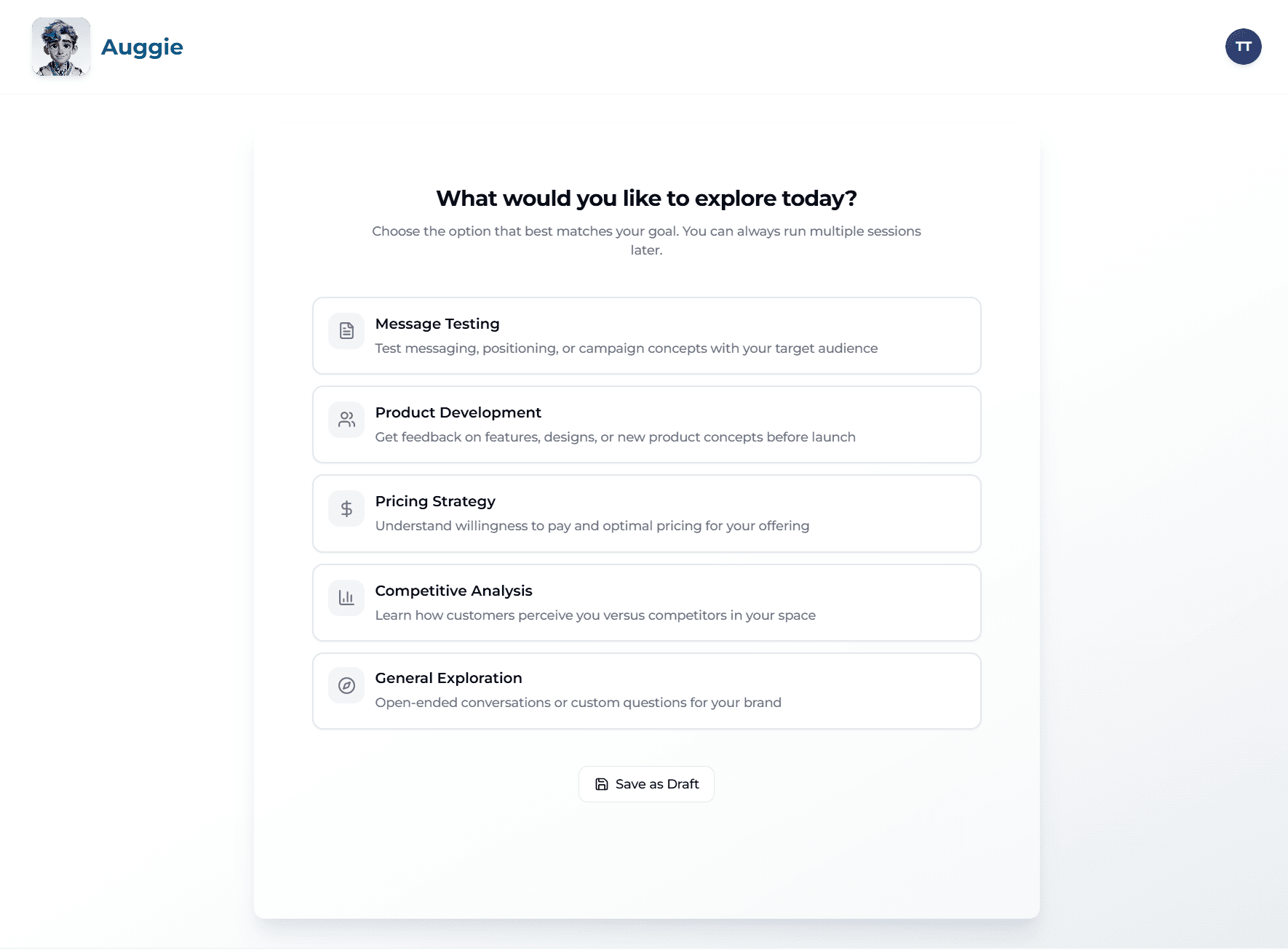
1) Choose Your Research Track (2 min)
When you start the Guided Discovery Wizard, you'll pick a research track that focuses Auggie on your actual goal. Don't overthink it — picking any track is better than a generic setup.
- Brand Positioning — How does your brand land with target customers?
- Message Testing — What resonates, and what falls flat?
- Product Development — How do real customers evaluate what you're building?
- Pricing Strategy — What will they pay, and what makes them hesitate?
- Competitive Analysis — How do you compare to alternatives in the room?
- General Exploration — Open research with no fixed hypothesis.
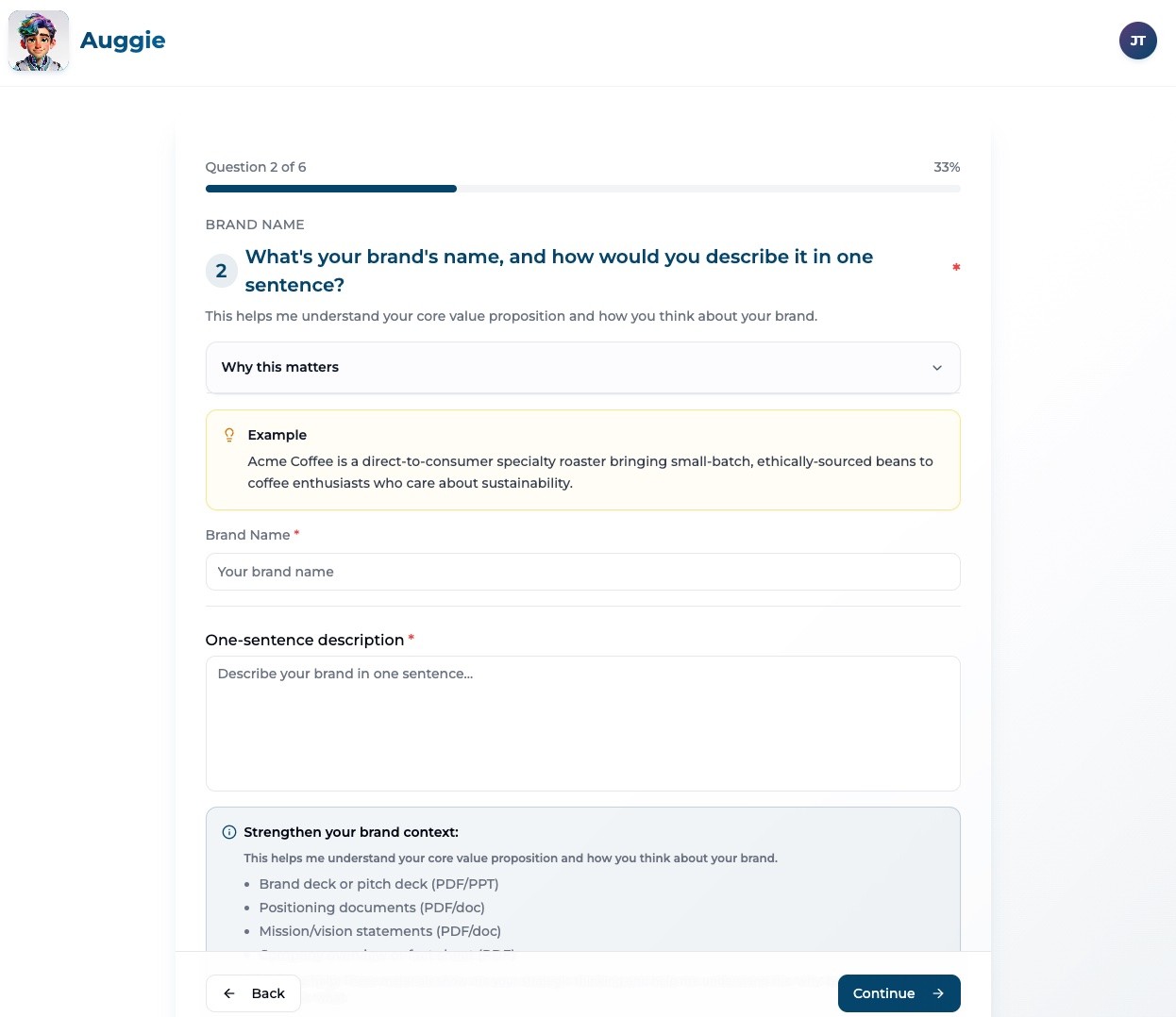
2) Answer the Discovery Questions (5 min)
Be specific about who your customer is, what problem you solve, and what you're trying to learn. The wizard asks 3–4 focused questions based on your track.
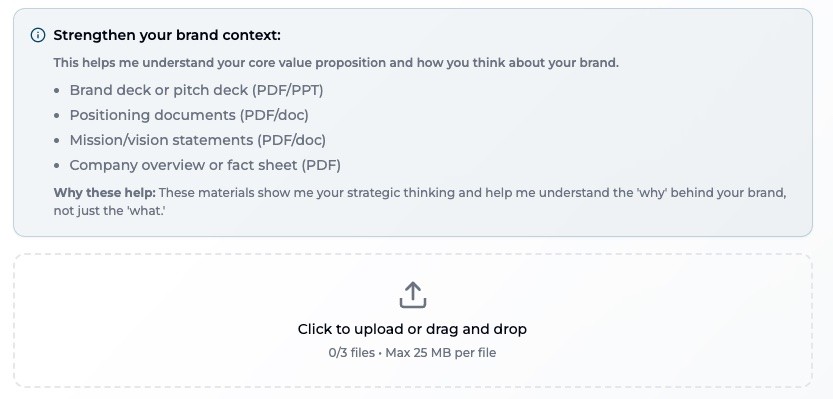
3) Upload Supporting Materials (Optional — 2 min)
Share up to 3 files per session — brand guidelines, pitch decks, ad concepts, or product one-pagers. Uploads add realism. Skip them if you want cold, unbiased reactions.
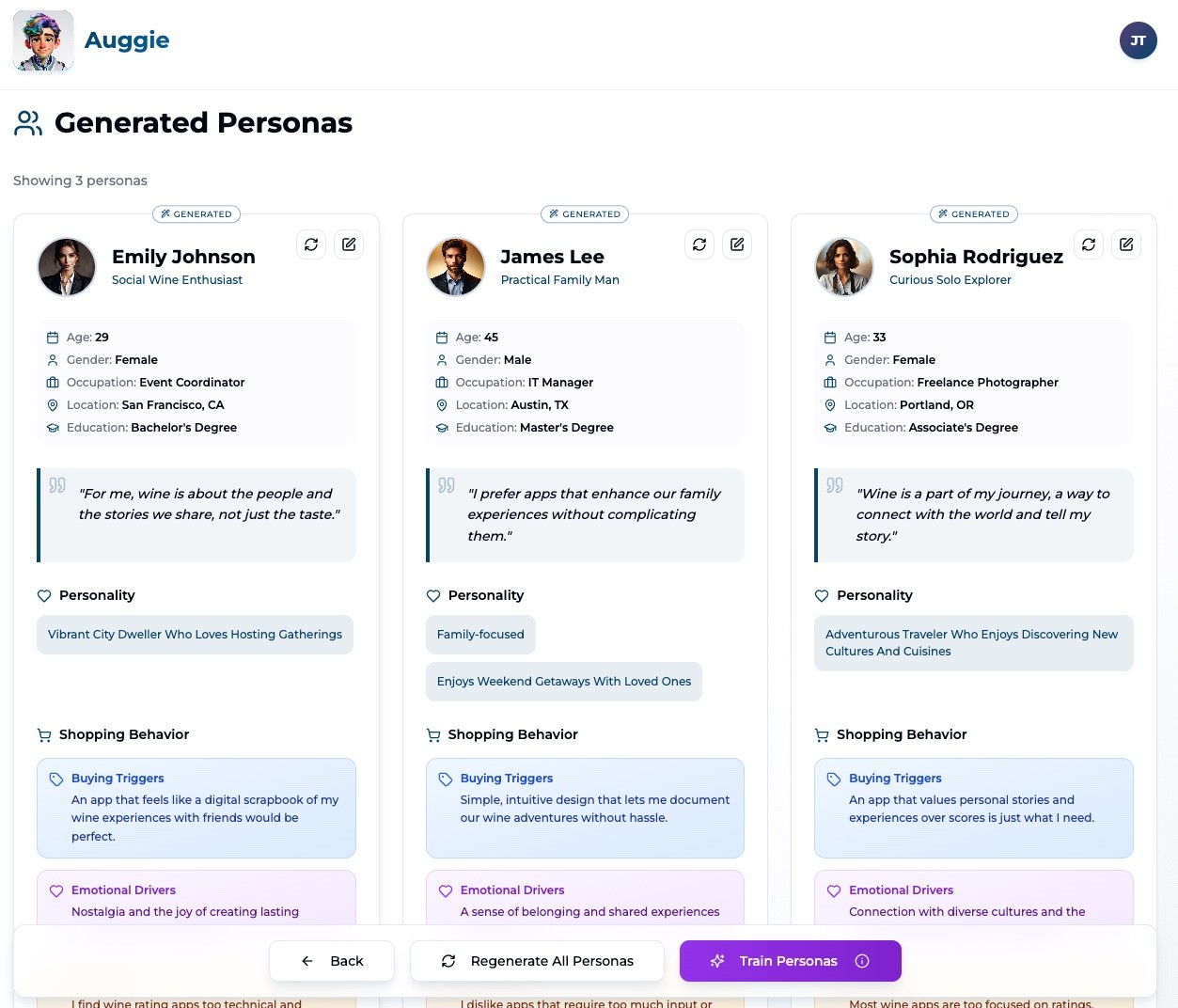
4) Sanity-Check Personas (2 min)
Before editing, ask yourself:
- What does each persona care about most?
- What would make them say no?
- Where do they naturally disagree?
Don't edit just to clean up language — good personas create tension.
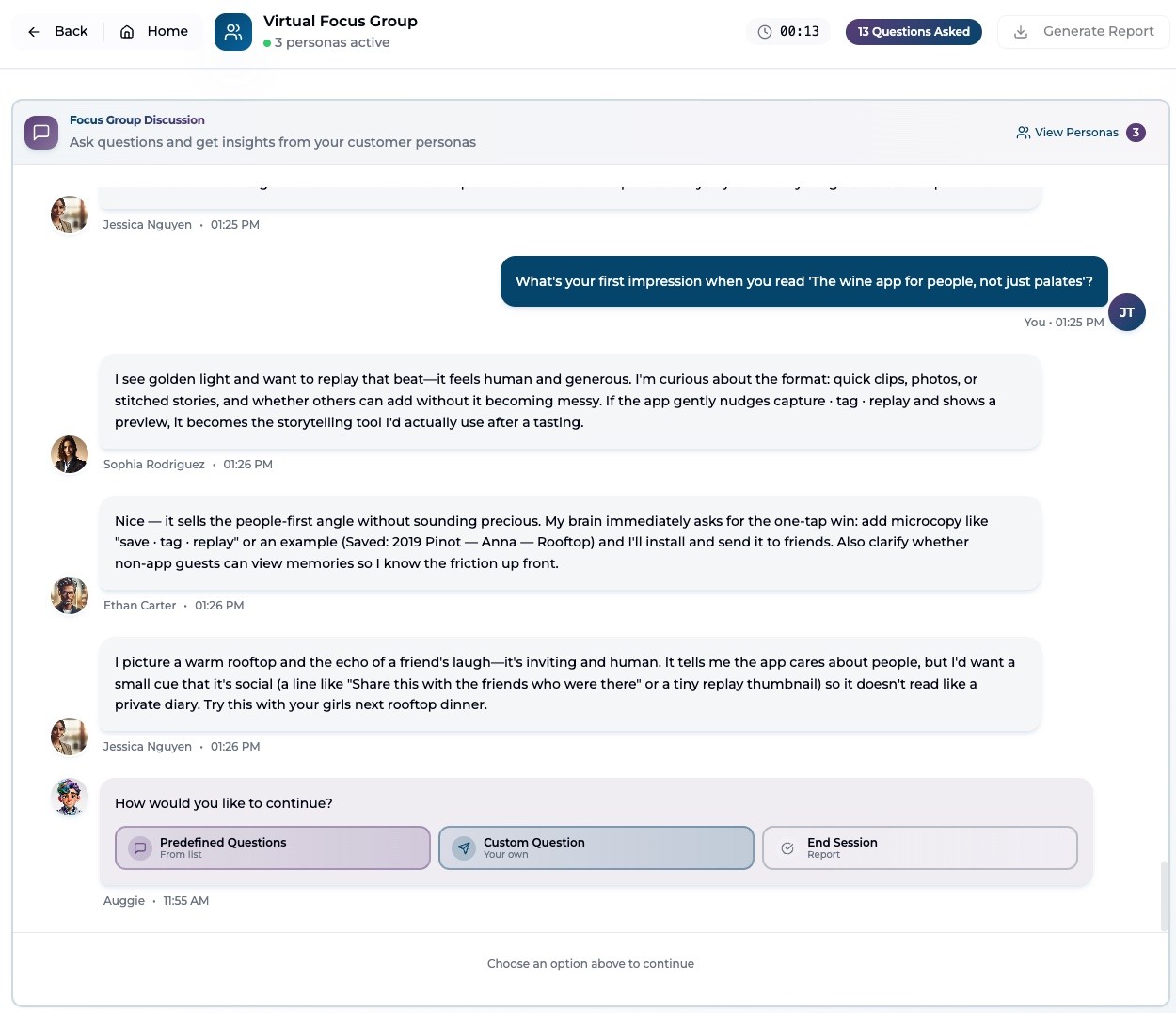
5) Run the Focus Group (10–15 min)
Start broad, then apply pressure. Read the pre-defined questions. Ask your own.
- Use @ to direct a question to a specific persona
- Ask one persona to react to another's feedback
- Upload a file mid-session for first-impression reactions
- Force tradeoffs and follow the strongest objection
6) End & Decide One Next Step (1 min)
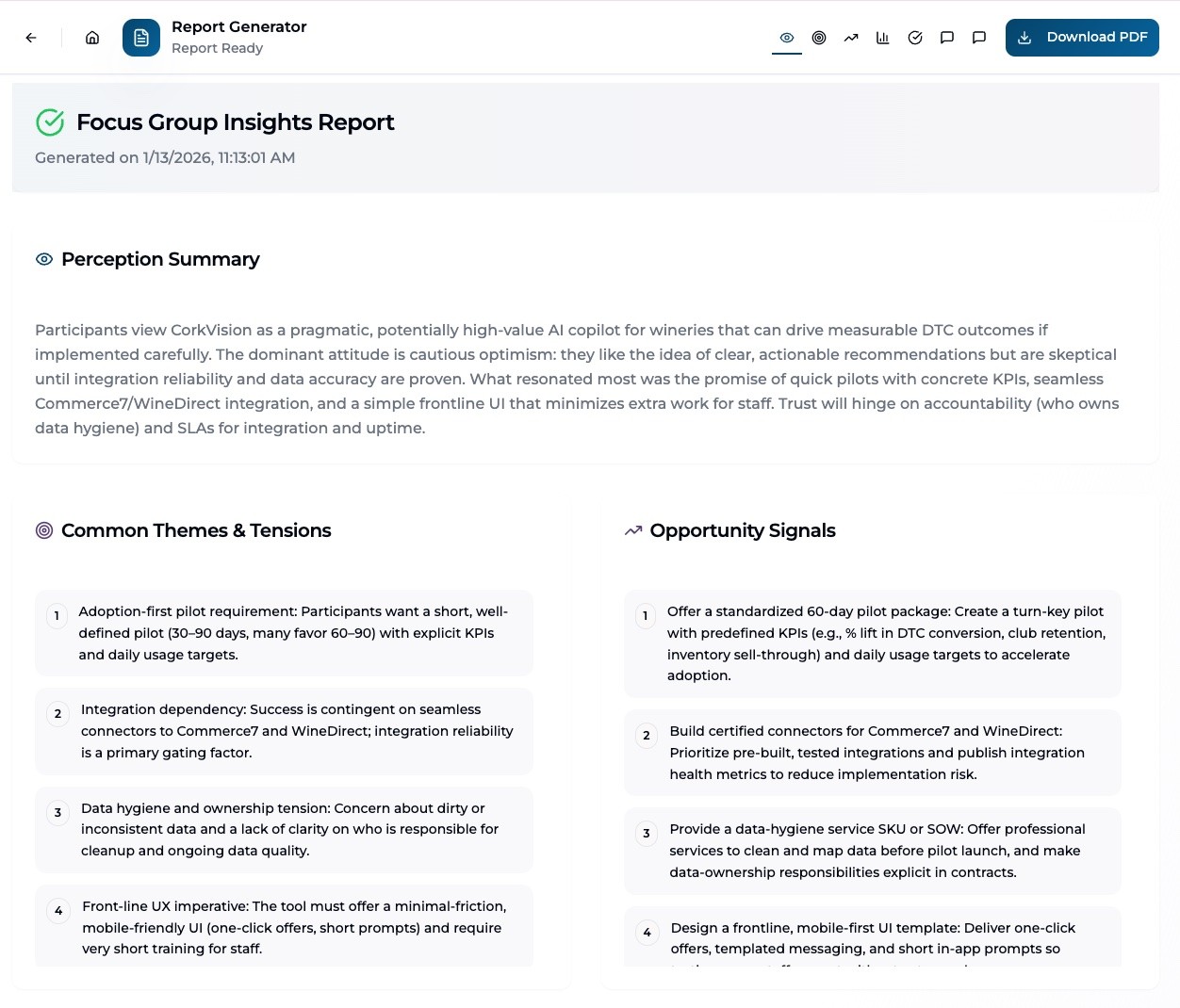
Generate the Insights Report. Look for:
- Repeated objections
- Trust gaps
- Where personas diverge
Decide one thing to test next: a messaging change, a proof point, or a follow-up session.
Example: Strong Session vs. Weak Session
| Weak Session | Strong Session |
|---|---|
| Discovery: "We're a wine analytics platform for wineries of all sizes." | Discovery: "CorkVision is an AI copilot for wineries doing $1M–$10M in DTC revenue — large enough to have complex data, too small to afford a full analytics team." |
| Persona: Generic Marketing Manager who says "This looks interesting." | Persona: Operations-focused winery manager who values ROI, integration with WineDirect/Commerce7, and time savings. |
| Question: "What do you think about this?" | Question: "What would make you distrust a tool like this?" |
| Result: Polite, non-committal feedback. No clear next step. | Result: Clear positioning gap identified. Next step: add data lineage visibility to messaging and test with follow-up session. |
1. The Guided Discovery Wizard: Choosing Your Research Track
The Guided Discovery Wizard is Auggie's structured intake layer. It replaces open-ended setup forms with a focused, step-by-step flow that takes about 7 minutes to complete.
What you input here directly shapes how personas think, speak, and push back. Vague inputs produce vague personas. Specific inputs produce focused ones.
How the Wizard Works
The wizard has five screens you move through linearly:
- Welcome — Overview and expectations
- Use Case Selection — Choose your research track
- Question Flow — 3–4 focused questions based on your track
- Review & Edit — Confirm your inputs before submission
- Processing / Handoff — Auggie generates your Discovery Report
The Six Research Tracks
Pick the track that most closely matches what you're trying to learn. You can always run a different track in a follow-up session.
| Track | Best When You Want To… |
|---|---|
| Brand Positioning | Understand how your brand lands with target segments. Test narrative clarity, differentiation, and emotional resonance. |
| Message Testing | Evaluate specific copy, campaigns, or positioning statements before they go live. |
| Product Development | Test concepts, features, or prototypes against real customer reactions at any development stage. |
| Pricing Strategy | Explore willingness to pay, price sensitivity, and how pricing communicates value. |
| Competitive Analysis | Test how your positioning holds up when customers are aware of alternatives. |
| General Exploration | Explore a space without a fixed hypothesis — ideal for early discovery or category research. |
Best Practices for Discovery Inputs
Every track asks slightly different questions, but the principles for strong inputs are the same:
1. Website Address (and Additional URLs)
Auggie uses your website(s) to infer positioning, tone, audience sophistication, and proof expectations.
- Primary site: https://corkvision.com
- Supporting URLs: pricing page, customer story page, campaign microsite
- A "coming soon" page or temporary landing page
- Social profiles instead of your actual website
2. Brand Name + One-Sentence Description
This sentence heavily influences how personas interpret your value.
- "CorkVision is an AI copilot for wineries that unifies DTC data from WineDirect, Commerce7, and Mailchimp to surface actionable insights, automate workflows, and drive revenue growth without adding headcount."
- Names the audience · States the problem · Explains the outcome · Sets ROI expectations
- "CorkVision is a modern analytics platform for the wine industry."
- "We help businesses unlock insights through AI." — Too vague. Personas don't know why they should care.
3. Product / Service + Typical Customer
This is where realism is won or lost. Define scale, constraints, and why your product exists.
- "CorkVision provides AI-powered analytics for wineries doing $1M–$10M in annual DTC revenue — large enough to have complex data, too small to afford a full analytics team."
- Personas now understand what resources are limited and what tradeoffs matter.
4. Brand Personality (When Asked)
Shapes emotional response to messaging and sets tone boundaries.
- "Insightful yet grounded. Confident without being arrogant. Think: the operator's co-pilot, not a flashy tech product."
- Uses contrasts · Anchors personality to behavior · Signals tone limits
5. Research Goals
Multiple goals create realistic tension. If your goals compete, personas will surface the conflict.
- "Our immediate goals are (1) customer acquisition through 10–15 pilots with measurable ROI, (2) brand awareness via thought leadership, and (3) investor readiness through a repeatable GTM motion."
- Creates competing priorities · Surfaces different success metrics · Enables realistic skepticism
2. Uploads: What to Share and When to Skip It
Uploads don't add volume — they add realism. You can run strong sessions without any uploads, but the right files dramatically sharpen persona specificity and pushback.
Two Types of Files in Auggie
| File Type | What It Is |
|---|---|
| Brand Files | Persistent materials that apply across all your sessions — brand guidelines, positioning documents, research reports. Upload once; reused automatically. |
| Session Files | Per-session uploads for a specific experiment — an ad concept, landing page draft, or product mockup. These don't carry over to other sessions. |
Session files are experimental inputs. Brand files are your standing brand context. Use both intentionally.
What to Upload in Discovery
During the wizard, you can attach up to 3 files that help Auggie understand your brand more deeply.
Brand & Messaging Assets (Highly Recommended)
- Brand guidelines or messaging frameworks
- Positioning decks
- Sales or pitch decks
- Website copy documents
Why this works: Anchors tone, reduces generic feedback, helps personas react to how you actually communicate.
Campaign & Concept Materials (Very Powerful)
- Ad mockups or storyboards
- Landing page drafts
- Email campaigns
- Product launch narratives
Why this works: Enables first-impression feedback, reveals emotional reactions, highlights the gap between intent and perception.
Sales & Product Context (Situational)
- One-pagers and product overviews
- Feature comparison slides
Why this works: Personas react like evaluators, forcing concrete questions about ROI, proof, and differentiation.
Uploading During a Focus Group (Advanced)

You can also upload files mid-session when asking custom questions. This works especially well for:
- "Here's a landing page — what's immediately unclear?"
- "Review this email — what would you ignore?"
- "What questions would you ask before trusting this claim?"
When to Skip Uploads Entirely
Skipping uploads is an intentional choice, not a failure. Skip when:
- You're exploring early-stage positioning from scratch
- You want cold, unbiased reactions uninfluenced by your materials
- You're testing language before creative exists
- You're pressure-testing assumptions, not execution quality
Customer Signal Uploads: Reviews and Transcripts
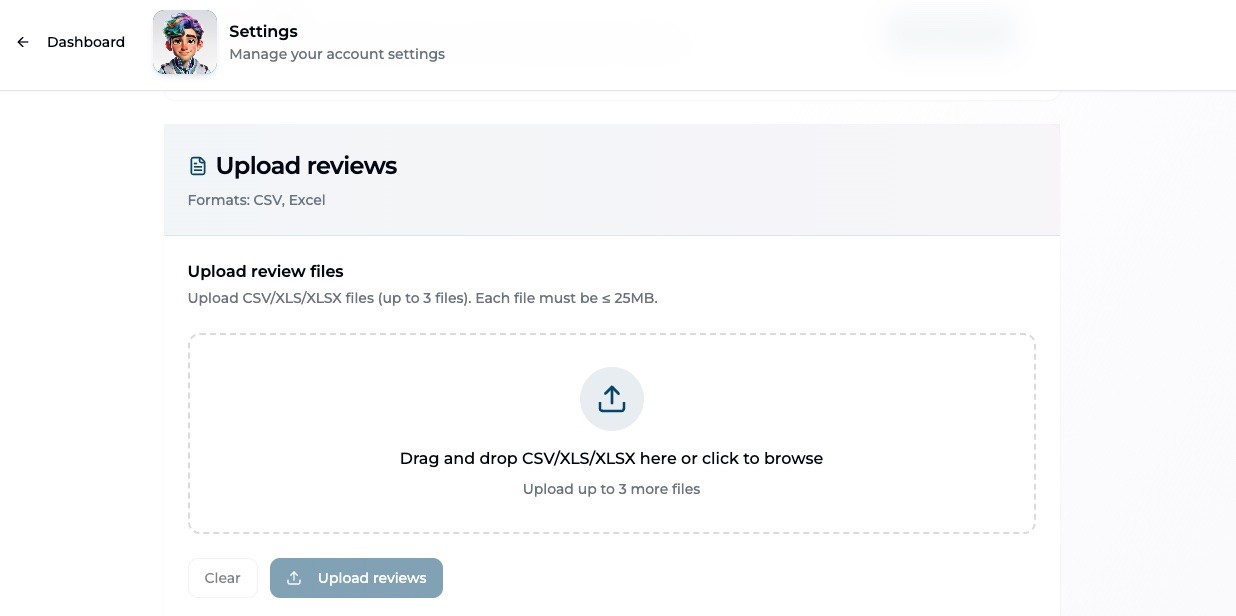
Auggie also supports uploading real customer data to make personas and insights more grounded in actual customer language. These are different from session files — they live in your customer intelligence layer and inform all future sessions. To upload Customer Reviews, go to Settings and navigate to the Upload Reviews section.
| Source | What It Adds |
|---|---|
| Website Review Datasets (CSV/Excel) | Product-specific first-party feedback. Upload a structured export from your site or platform. |
| Customer Service Transcripts | Root-cause pain points and friction. Auggie extracts recurring issues, tone patterns, and language from support conversations. |
Once ingested, these signals feed into Persona Enrichment and become available in the Insight Traceability Panel. See Section 6 for more on how this works.
3. Personas: Three Types, One Strategy
Personas are lenses, not answers. They represent tradeoffs, incentives, and constraints — not demographics. They're designed to disagree with each other, ask for different proof, and react emotionally as well as logically.
Three Persona Types
Generated Personas
Auggie creates these from your Discovery inputs and enrichment data. They're built to reflect realistic customer archetypes for your market, with distinct motivations and objection patterns.
Generated personas can be edited — you can modify role, motivations, attributes, and personality. Edit when a persona contradicts your actual customer reality, not just to clean up language.
Uploaded Personas (Bring Your Own)
If your brand already has persona work — from an agency, a research project, or internal research — you can upload those personas directly, after Discovery is completed. Auggie reads your documents (PDF, PPTX, DOCX), extracts the persona definitions, and transforms them into interactive conversational agents.

Uploaded personas preserve your existing work. They can't be destructively edited, but they can be session-calibrated.
Anti-Personas: The Pressure Test
Anti-personas represent customer types who are strategically misaligned with your brand — segments that misunderstand your value, churn quickly, or engage primarily on price. They're not caricatures. They're realistic representations of bad-fit customers.
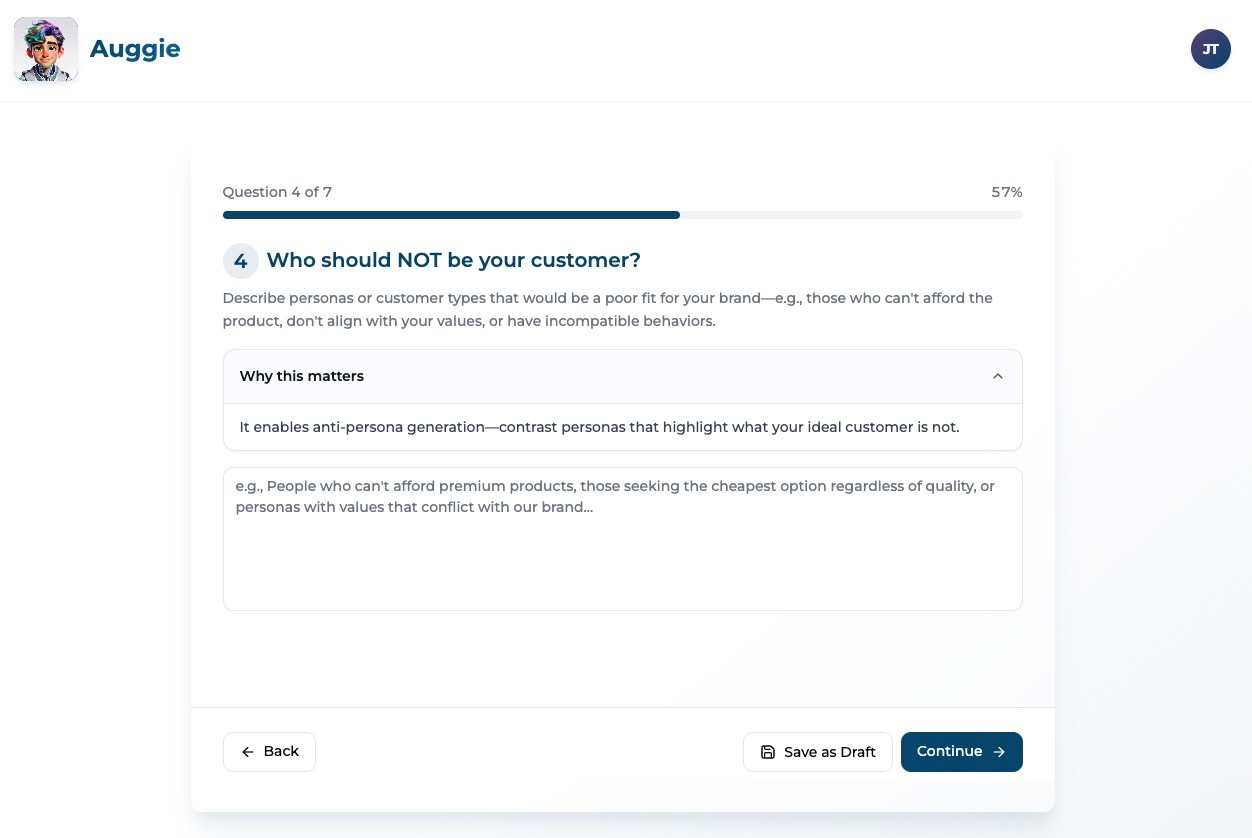
Anti-personas are generated when you explicitly request one in the Discovery Wizard. When included, Auggie generates 2 target personas + 1 anti-persona.
Strong use cases for anti-personas:
- Pressure-testing claims against a skeptical, price-driven buyer
- Surfacing friction points that target personas overlook
- Validating that your messaging doesn't accidentally attract the wrong segment
How to Read Personas Before Running a Session
Before editing anything, read each persona through these four lenses:
- What does this persona care about most?
- What are they skeptical of?
- What would make them say no?
- What proof would they demand before trusting you?
When to Leave Personas As-Is
- They feel realistic, even if imperfect
- They disagree naturally with each other
- They challenge your assumptions without being forced
If they're making you slightly uncomfortable, they're probably working.
When to Edit Personas
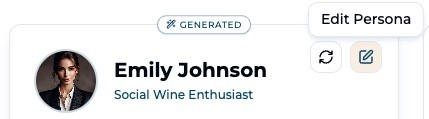
- Two personas feel interchangeable — they need distinct perspectives
- A persona contradicts your stated customer reality
- A role or context is clearly wrong for your market
Using Personas as Question Strategy
Each persona type should influence how you ask questions. Design your questions with the persona's worldview in mind:
| Persona Type | Question Approach |
|---|---|
| ROI-driven, skeptical (or anti-persona) | "What would make this not worth the effort?" / "What would you need to see before trusting this claim?" |
| Innovation-oriented | "What excites you about this approach?" / "What would you tell a colleague?" |
| Risk-averse | "What feels unclear or overpromised?" / "What's the risk in adopting this?" |
| Uploaded persona (role-specific) | "From your perspective as [role], what breaks first here?" |
4. Running a Strong Focus Group
Core principle: Insight comes from tension, not agreement. Your job is to shape the conversation — what you ask, how you follow up, and where you apply pressure.
How to Think About Focus Groups
| Strong Session | Weak Session |
|---|---|
| Starts broad, then narrows toward specific friction | Asks abstract or leading questions upfront |
| Surfaces emotional reactions before logical analysis | Seeks validation and moves on too quickly |
| Forces tradeoffs and follows strong objections | Ends without synthesis or a concrete next step |
| Lets personas disagree and follows the contrast | Treats all responses as equally weighted |
Opening Questions Matter Most
Your first question sets the tone for the entire session.
- "What's your first reaction when you hear this?"
- "What stands out — positively or negatively?"
- "What expectations does this set for you?"
- "Do you like this?"
- "Would you use this?"
- "Does this make sense?"
Mid-Session Question Types
Emotional & Perceptual
- "What excites you about this — if anything?"
- "What makes you skeptical?"
- "What feels unclear or overpromised?"
Tradeoff & Friction
- "What would make this not worth the effort?"
- "What would you have to give up to adopt this?"
- "What's the risk in trusting a tool like this?"
Proof & Trust
- "What proof would you need before believing this?"
- "What questions would you ask the founder?"
- "What would make you distrust this claim?"
Why this matters: Proof questions expose sales friction. Trust is contextual — it has to be earned, not declared.
Using Persona-to-Persona Reactions
You can explicitly ask personas to react to each other. This is where sessions shift from interviews to real group dynamics.
- "Sophia, what do you think about David's concern?"
- "Angela, do you agree with Michael or see this differently?"
- "Who here disagrees most — and why?"
Directing Questions to Individuals vs. the Group
Questions go to all personas by default — great for identifying patterns across the group. Use directed questions (with @) when:
- You want a specific professional lens (ops vs. marketing vs. finance)
- One persona reacted strongly and you want to go deeper
- You want to stress-test an edge case against one archetype
Example: "David — from an operations perspective, what breaks first here?"
Closing the Session
A good session ends with synthesis, not exhaustion.
- "What would make this a clear yes?"
- "Who is this not for?"
- "What would you tell a colleague about this?"
You should leave with clear objections, proof gaps, and at least one concrete next step.
5. Interpreting Outputs & Deciding What to Do Next
Core principle: Insight lives in patterns, not quotes. Auggie gives you signals — your job is to interpret them correctly.
What Auggie Outputs Actually Are
Auggie's outputs are directional, qualitative, and designed to inform what to explore next. They are not statistically representative findings — they are research signals.
What to look for: Repeated reactions, consistent skepticism, and sharp disagreements. These patterns are the real output.
How to Read Persona Responses
| Strong Interpretation | Weak Interpretation |
|---|---|
| You notice two personas push back on pricing, one asks for proof, and the word "effort" keeps appearing independently | You notice one persona says "I'd definitely use this" |
| You conclude: "We have a perceived ROI problem, not a feature problem." | You conclude: "We're validated." |
| Next step: Refine messaging, test proof points, adjust onboarding narrative | Why this fails: Ignores objections, overweights enthusiasm, misses risk signals |
Patterns Matter More Than Opinions
- What multiple personas mention independently
- Where personas disagree — and why
- What language they naturally use (this is your copywriting gold)
- Cherry-picking quotes that confirm what you already believe
- Averaging sentiment as if all reactions carry equal weight
- Turning feedback directly into a feature checklist
Using Disagreement as Strategy
Disagreement is not a failure. It's a map.
When two personas disagree sharply, ask: "Why does this matter more to you?" and "What would change your mind?" You'll learn which segment is a better fit and where your positioning breaks down for specific audiences.
Turning Insights into Next Steps
Every session should end with at least one concrete action.
- Rewrite positioning using the language personas naturally used
- Add proof points to landing pages or sales materials
- Create a follow-up session focused on a specific objection
- Test messaging with a different persona mix or calibration
- "Let's think about this."
- "We'll revisit later."
- "Seems generally positive."
When to Run Another Session
Run another session when:
- You uncovered new objections that deserve focused exploration
- You've changed your messaging or positioning and want to test the delta
- You want to test a narrower hypothesis with a specific persona calibration
6. "Why Auggie Thinks This": The Insight Traceability Panel
Auggie doesn't just generate insights — it shows you where they come from. The Insight Traceability Panel is how Auggie demonstrates that its outputs are grounded in real inputs, not fabricated from thin air.
When It Appears
During a focus group, you'll see a small link next to persona responses and insights:

The panel shows the signals that influenced the response: what data was used, how often the pattern appeared, how recent it is, and how strongly it registers.
What the Panel Shows
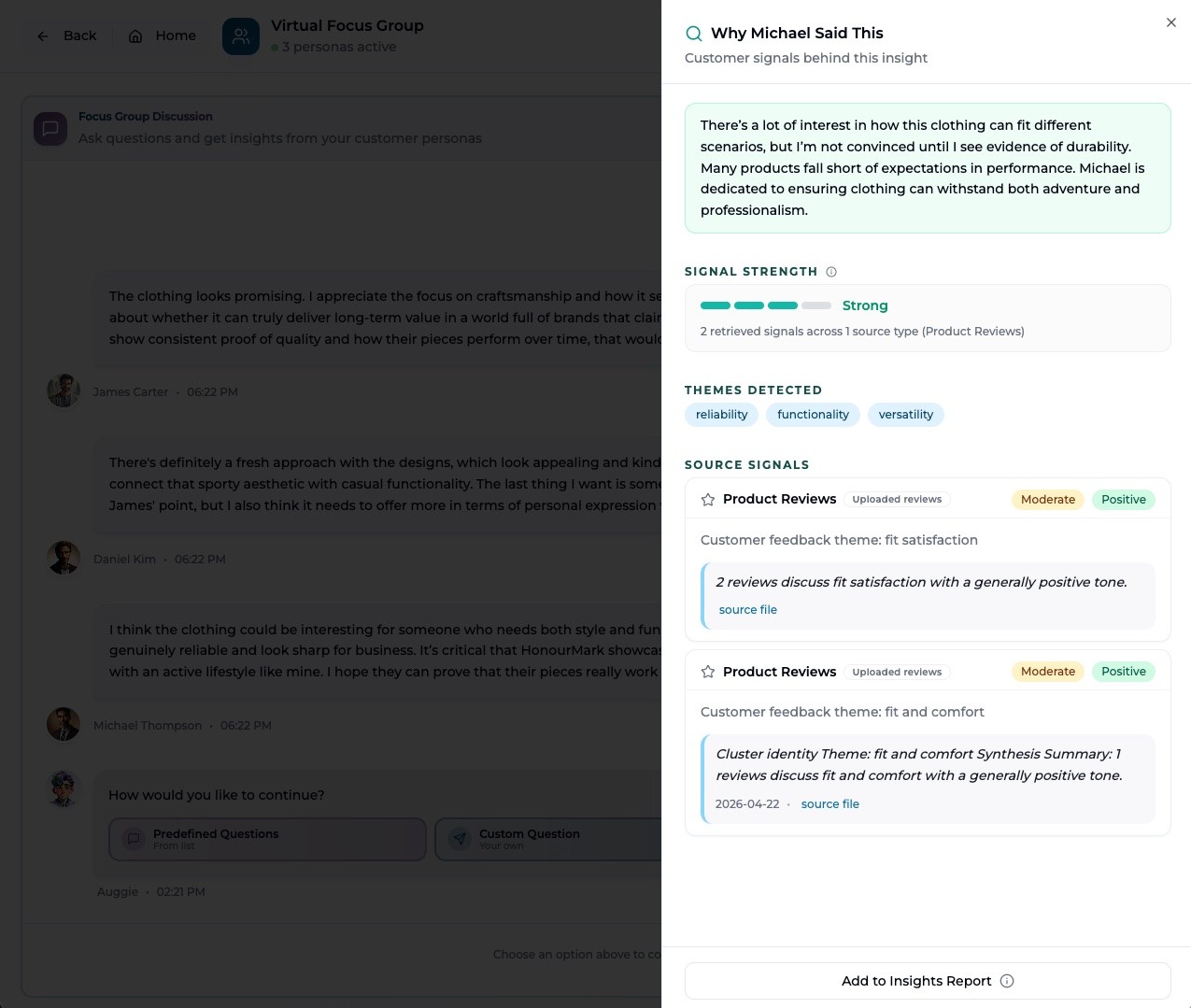
Each traceability card contains:
- The extracted theme and its signal strength (Dominant / Strong / Moderate / Emerging)
- Source mix — how many reviews, transcripts, or session mentions contributed
- A representative quote or evidence excerpt
- Freshness — how recent the underlying data is
Three Input Types
The Traceability Panel organizes signals by input nature — not by quality. These are three different kinds of inputs, each contributing something different to Auggie's outputs.
| Input Type | What It Represents |
|---|---|
| Brand Context | Information Auggie learned from your Discovery inputs, uploaded brand files, and materials — your positioning, messaging, and stated goals. |
| Customer Signals | Themes and language patterns drawn from real customer data — reviews, support transcripts, and uploaded datasets connected to your brand. |
| World Context | Broader category dynamics, market trends, and competitive environment that ground personas in current industry reality. |
Signal Strength Indicators
| Signal Strength | What It Means |
|---|---|
| Dominant | A near-universal pattern across sources. Very strong signal. |
| Strong | Appears consistently across multiple sources and contexts. |
| Moderate | Present across sources but with meaningful variation. |
| Emerging | Newer pattern or limited signal volume. Worth watching but not yet conclusive. |
Adding Traceability to Your Insights Report
When you see a traceability item that supports a key finding, click "Add to Report". That evidence card will be included in the Key Findings section of your next generated report.
The report will show a purple-highlighted card beneath the relevant finding that reads "Why Auggie said this" — with the source-backed rationale visible to anyone who reads the report.
Why This Matters
Traceability is what separates Auggie from a generic AI that generates plausible-sounding research. When a persona says "Operational performance is the adoption gate," you can now show exactly why — with the data sources and dominant theme behind it.
It turns AI-generated insight into evidence-backed analysis. That's the difference between something you act on and something you wonder about.
7. Using the Insights Report
Core principle: Turn conversation into confident decisions. When you end a focus group, Auggie generates a multi-section Insights Report. Each section serves a different purpose.
Report Overview
| Section | Primary Purpose |
|---|---|
| Perception Summary | Executive-level framing — the headline, not the verdict |
| Themes & Tensions | Core customer friction points and strategic conflicts |
| Opportunity Signals | Hypotheses for exploration, not marching orders |
| Key Findings | The most defensible takeaways, supported across multiple personas |
| Recommendations | Synthesized next steps — directional, not prescriptive |
| Moderator Reflection | How the session behaved, not what users said |
| Full Chat Transcript | Your source of truth and evidence base |
Perception Summary
The "headline" — a compressed synthesis of how the group collectively perceives the brand or concept. Use it to frame internal discussions, set context for leadership, and guide what to explore next.
Themes & Tensions
The strategic core — repeated friction points that matter to users. Treat these as inputs into positioning, constraints on product adoption, and signals for what your messaging must address.
Opportunity Signals
Hypotheses, not marching orders. These tell you what might unlock value if explored further. Use them to design follow-up focus groups, test messaging, or prototype lightweight validation concepts.
Key Findings
What survived the conversation — the most defensible takeaways, supported across multiple personas and examples. Treat them as inputs to prioritization, anchors for internal alignment, and guardrails for roadmap discussions.
If you added traceability cards during the session, they'll appear here — as evidence cards beneath the relevant findings, labeled "Why Auggie said this."
Recommendations
Synthesized insights expressed as directional next steps. Read these as strategic hypotheses to pressure-test, not instructions to execute.
Ask yourself: "Which of these would most reduce adoption risk or close the most important gap?" Start there.
Moderator Reflection
A meta-commentary on how the session itself behaved — not what users said, but how the group engaged. Use it to judge confidence level, spot where follow-ups are needed, and understand session dynamics.
Example: "Highly pragmatic... preferred manual validation..." tells you this group prioritized operational realism — future sessions should consider concrete scenarios or live demos.
Full Chat Transcript
Your source of truth — not your takeaway. Use the transcript to validate interpretations, pull direct quotes for stakeholder communication, understand edge cases, and resolve internal debates.
8. How to Give Great Feedback
We're building Auggie to help marketers make faster, more confident decisions. Your feedback directly shapes the product.
What We're Testing
Persona Realism
- Do personas feel like real people with real constraints?
- Do they disagree in ways that mirror your actual customers?
- Do their objections surface blind spots you hadn't considered?
- Do uploaded personas behave consistently with your original intent?
- Do anti-personas produce genuinely uncomfortable pressure?
Discovery & Track Selection
- Did the research track you chose feel right for your goal?
- Did the wizard questions give you enough room to be specific?
- Did the personas generated from Discovery feel realistic?
Focus Group Flow
- Where did you want more guidance on what to ask?
- Were there moments you wanted to probe deeper but weren't sure how?
- Did calibration work as expected?
Traceability & Trust
- Did the "Why did Auggie say this?" panel help you trust the output?
- Were any traceability explanations confusing or unhelpful?
- Did evidence cards in the report add value when sharing with others?
Report Clarity
- Did the Insights Report surface actionable takeaways?
- Were any sections confusing or less useful?
- Did you feel confident using the findings to make a decision?
The 3-Question Feedback Framework
After each session, share:
1. What surprised you? (positive or negative)
Example: "I expected personas to be more agreeable, but the anti-persona pushed back hard on pricing — exactly what I needed."
2. Where did you get stuck?
Example: "I wasn't sure how to use calibration effectively. I wanted to test a price-sensitive scenario but wasn't sure what to write."
3. What would make your next session better?
Example: "I wish there were suggested calibration scenarios based on the research track I picked."
How to Share Feedback
After your session:
Fill out the Beta Feedback Survey- Share your Insights Report link with us along with what you were trying to learn, what worked, and what you wish had happened differently
- Schedule a debrief so we can run through your feedback live